
Quote-to-cash (Q2C) automation is the end-to-end process of connecting your sales quoting, contracting, order management, billing, and cash collection into a single, system-driven workflow with minimal manual handoffs. The single best next step for most organizations: run a discovery session followed by a demo-first pilot scoped to order intake or dispute handling, the two phases where manual work is heaviest and ROI is fastest.
The highest-return automation targets are:
- Order entry and RFQ intake: Parsing inbound emails, PDFs, and informal purchase orders into structured ERP records eliminates the re-keying that slows every deal.
- Dispute triage: Automatically classifying and routing billing disputes cuts resolution time and protects cash flow.
Pro tip: Start with your unstructured communications, the inbox where customer orders, RFQs, and dispute notices arrive as free-form emails or attachments. That is where the most manual labor hides, and where automation yields the highest ROI.
I am Kahin Warsame, founder of KWA Digital, a web design and business systems studio. Most of the quote-to-cash pain I see does not come from missing software; it comes from disconnected software and the manual re-keying between systems. This guide covers the full process map, the modules actually worth automating, the questions to press vendors on, and the numbers that prove it worked.
What does the step-by-step quote-to-cash process look like?
A practical 10-step map helps you see exactly where manual work lives and which automation approach fits each phase.
- 1. RFQ and order intake: Requests arrive as emails, PDFs, and informal purchase orders. Manual work: reading inboxes and re-keying details. Automation: AI parsing turns unstructured requests into structured CRM and ERP records.
- 2. Configuration and pricing: The right products at the right price for this customer. Manual work: spreadsheet price checks and guesswork discounts. Automation: a CPQ engine enforces price books and discount rules.
- 3. Quote generation and review: A formatted proposal is built and reviewed. Manual work: copy-pasting line items into Word or PDF templates. Automation: CPQ auto-generates branded proposals; sales document automation handles template population and version control.
- 4. Approvals: Discounts and non-standard terms get signed off. Manual work: email chains that stall deals. Automation: a sales approval workflow with rule-based routing by deal size, discount threshold, or terms.
- 5. Contract and e-signature: Terms are finalized and signed. Manual work: print-sign-scan and version confusion. Automation: contract templates, clause libraries, and e-signature with automatic reminders.
- 6. Order entry: The accepted quote becomes an order of record. Manual work: re-keying the same data into the ERP. Automation: API-driven order creation with validation rules.
- 7. Fulfillment or provisioning: The product or service is delivered or activated. Manual work: handoff emails between teams. Automation: triggers that notify or provision automatically on order confirmation.
- 8. Invoicing: Billing is generated from what was actually sold. Manual work: building invoices by hand from contract terms. Automation: a billing engine generates invoices from contract and usage data.
- 9. Payment collection and cash application: Customer pays; payment is matched to the invoice. Manual work: manual bank reconciliation and remittance matching. Automation: AI-driven reconciliation matches payments across sources and flags exceptions automatically.
- 10. Disputes and renewals: Issues get resolved and contracts renew. Manual work: inbox triage and forgotten renewal dates. Automation: automatic dispute classification and routing, plus renewal countdowns.
Pilot sequence: Start with steps 1 and 6 (RFQ intake and order entry). They are mailbox-heavy, high-volume, and produce measurable accuracy gains quickly. Extend to steps 4 and 10 (approvals and disputes) in the second phase.
What core components do you actually need to automate?
Most vendor pitches bundle every possible feature into a single platform price. The table below separates the modules that move the needle from the ones that rarely justify their cost in the first 12 months.
| Module | Primary automation value | Key integration touchpoints |
|---|---|---|
| CPQ / configuration engine | Eliminates manual pricing errors; enforces discount rules | CRM (opportunity data), ERP (price books, product catalog) |
| Contract Lifecycle Management (CLM) | AI clause extraction; automated redlining and e-signature | CRM, legal systems, order management |
| Billing and metering | Usage-based invoice generation; automated reminders and smart retries | ERP, payment gateway, subscription platform |
| Payment reconciliation | Automated cash application; exception flagging | Bank feeds, ERP AR module |
| Order management | API-driven order creation; validation rules | ERP, fulfillment/provisioning systems |
| CRM / ERP integration layer | Single source of truth for customer and product master data | CRM, ERP, data warehouse |
| Analytics and BI | Real-time DSO, invoice accuracy, and cycle-time dashboards | Data warehouse, ERP, CRM |
The features inside each module that deliver the most value are AI-powered RFQ parsing, automated order entry from unstructured documents, rule-based approval routing, and contract-term extraction for billing setup. No-code integration platforms advertise measurable gains in quote speed and revenue recognition by connecting these modules, though buyers should validate those claims during a pilot with real customer documents. The integration layer itself is the foundation; our guide to ecommerce CRM integration covers how to get that part right.
Platforms that handle structured EDI and templated OCR well often underdeliver on freeform emails and informal change requests. Vendor pages frequently highlight template-based document handling but may not address the full range of unstructured inbound messages that cause the most delays. Ask specifically about this during demos.
How do you choose the right approach or partner?
The evaluation criteria that matter most, in priority order: integration depth, data model fit, extensibility, implementation support quality, total cost of ownership (TCO), and security posture. Price is rarely the right primary filter.
Exact questions to ask vendors and partners
Integration and data:
- Which CRM and ERP systems do you have certified, production-tested integrations with, and what is the data sync frequency?
- How does your platform handle unstructured inbound documents (freeform emails, informal POs, scanned PDFs)?
- What is your approach to customer and product master data conflicts between CRM and ERP?
- Can you show a live demo with our actual document types, not just sample templates?
Implementation and support:
- What does your implementation methodology look like, and do you offer a scoped pilot before full deployment?
- Who owns the integration layer post-go-live: your team, our team, or a third party?
- What are your SLAs for integration uptime and support response?
- Can you provide references from clients in our industry with similar billing complexity?
Roadmap and customization:
- What are the limits of configuration before we hit custom development?
- How do you handle custom pricing rules or non-standard contract terms?
- What is your product roadmap for AI-assisted features over the next 12 months?
- How are breaking API changes communicated and managed?
Commercial and risk:
- What does the full TCO look like over three years, including implementation, integration, and support?
- What are the data portability and exit terms if we need to switch platforms?
- What security certifications do you hold, and when were they last audited?
Red flags to watch for
- Vague answers about integration ("we connect to everything via Zapier") without a named, tested connector
- No sandbox or staging environment for pre-production testing
- Missing SLAs in the contract, or SLAs that only cover platform uptime, not integration performance
- Demo uses only sample data, never your actual documents or pricing rules
What ROI looks like and the KPIs to track after go-live
The metrics that prove business value are specific and measurable. Vague claims about "efficiency gains" do not survive a CFO review.
| KPI | Why it matters | How to measure | Realistic target |
|---|---|---|---|
| Days Sales Outstanding (DSO) | Measures cash collection speed; directly tied to working capital | AR aging report: average days from invoice to payment | Reduce within months |
| Invoice accuracy / error rate | Errors trigger disputes and delay payment | Disputed invoices ÷ total invoices issued | Below 2% error rate |
| Time-to-quote | Slow quotes lose deals; fast quotes signal operational maturity | CRM timestamp: opportunity created → quote sent | Under 4 hours for standard configurations |
| Quote-to-order cycle time | Measures friction between agreement and revenue booking | CRM/ERP: quote accepted → order confirmed | Reduce by 60% |
| Dispute resolution time | Unresolved disputes hold cash and damage relationships | Helpdesk/AR: dispute opened → credit memo or resolution | Cut resolution time in half |
| Automation coverage % | Shows how much of the process is system-driven vs. manual | Automated transactions ÷ total transactions | 80% of transactions within a year |
| Cost per order | Tracks operational efficiency of the order management function | Total order processing cost ÷ orders processed | Reduce by 50% |
Integrated invoicing platforms like Stripe Invoicing improve DSO directly through automated payment reminders and smart retries for failed payments, two features that recover revenue that would otherwise require manual follow-up.
A simple payback scenario
Assume a 50-person SaaS company processes 400 orders per month manually, at an average of 20 minutes per order. At a fully loaded labor cost of $35/hour, that is roughly $93,000 per year in order-entry labor alone. An automation layer that handles 80% of those orders at over 90% accuracy reduces that cost to approximately $18,600 per year in exception handling. If the implementation costs $60,000, payback occurs in under 9 months, not counting DSO improvement or dispute reduction.
For post-go-live instrumentation, build a BI dashboard that surfaces DSO, invoice accuracy, and automation coverage in real time. Revenue operations should own the dashboard; finance should review it monthly.
Key takeaways
Automating the quote-to-cash process requires a phased, demo-first approach that starts with order intake, proves accuracy on real documents, and extends to billing and dispute resolution only after the integration layer is validated.
| Point | Details |
|---|---|
| Start with order intake | RFQ parsing and order entry deliver the fastest, most measurable ROI in the first pilot phase. |
| Validate on real documents | Demo accuracy on sample data does not predict production performance; always test with your actual customer communications. |
| Track DSO and invoice accuracy | These two KPIs are the clearest early signals that automation is working and cash flow is improving. |
| Integration depth beats feature count | A platform with deep CRM/ERP connectors and unstructured-document handling outperforms a feature-rich suite with shallow integrations. |
| KWA Digital's demo-first pilot | We build a working prototype on your data before any full build, reducing implementation risk and accelerating time-to-value. |
The gap between what automation promises and what actually ships
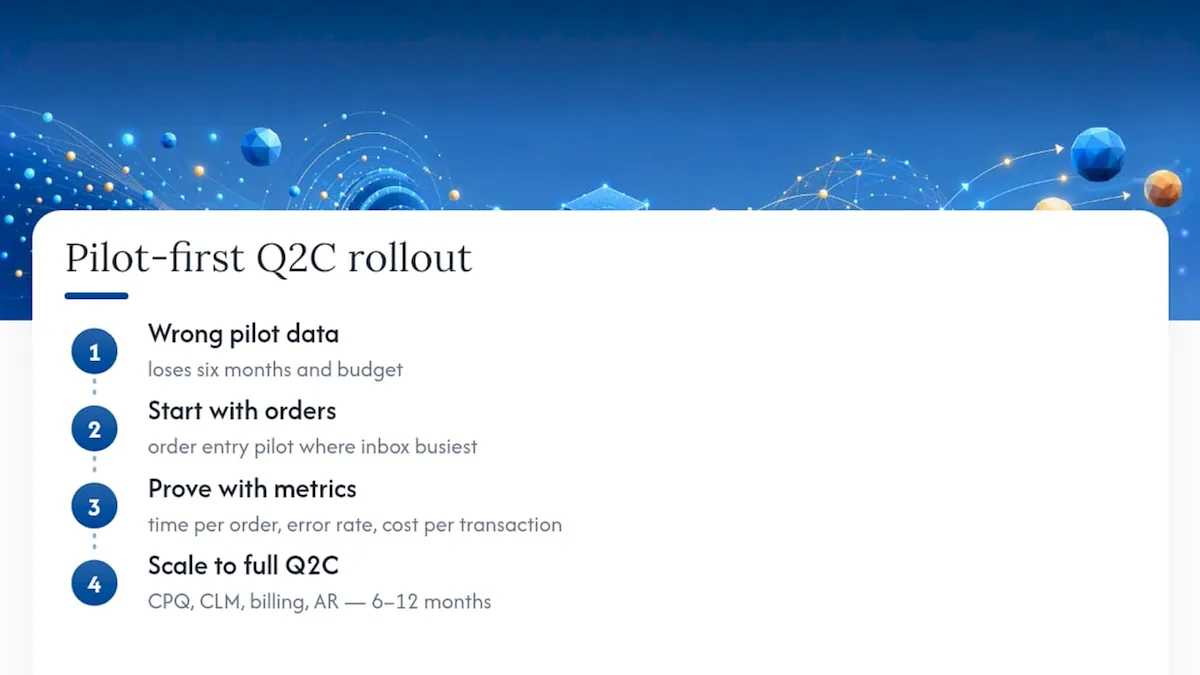
Most Q2C automation projects fail not because the technology is wrong, but because the pilot was run on the wrong data. Vendors demo with clean, structured sample documents. Your customers send informal emails, scanned PDFs with handwritten notes, and purchase orders that reference last quarter's pricing. That gap, between demo conditions and production reality, is where most implementations lose six months and a significant portion of their budget.
The conventional wisdom says to start with the biggest, most complex integration first: connect the ERP, build the full CPQ, wire up the CLM. My view is the opposite. Start where the inbox is busiest. Order entry is the pragmatic pilot that proves the value of automation quickly, with a clear before-and-after metric (time per order, error rate, cost per transaction). Once that proof point exists, the internal case for extending automation to quotes, contracts, and disputes writes itself.
The other thing most guides understate is change management. A technically perfect system that sales teams route around is worth nothing. The demo-first approach matters here too: when the people who will use the system see a prototype built on their own workflow before any code is committed, adoption resistance drops substantially. They are not being handed a system; they helped shape it.
Realistic timelines matter. A scoped order-intake pilot can show measurable results in 4-6 weeks. A full Q2C implementation across CPQ, CLM, billing, and AR typically takes 6-12 months depending on integration complexity. Anyone promising a full deployment in 8 weeks is either scoping it very narrowly or setting you up for a painful go-live.
KWA Digital's demo-first Q2C pilot: see your system before you build it
Most automation projects ask you to commit to a full build before you have seen anything work with your actual data. KWA Digital does the opposite. The demo-first pilot starts with a working prototype scoped to your highest-volume manual process, typically order intake or quote generation, built on your real documents and pricing rules, delivered in 4-6 weeks.
You walk away from the pilot with a validated automation layer, a clear accuracy benchmark, and a concrete ROI calculation to take to your CFO. No six-month commitment before you see results. If you are ready to stop re-keying orders and start closing the gap between quote and cash, start with a discovery call, or read our guides to sales document automation, sales proposal automation, contract automation, and what data should sync between CRM, billing, and ERP to scope your pilot.
See your system before you build it.
Tell us where your quote-to-cash process leaks the most hours, and we will build a working prototype on your real documents. Clear scope, honest pricing, no six-month commitments.
Request a free demo