
Sales document automation is the process of using software to automatically create, fill, send, and track sales documents, like proposals, quotes, and contracts, using data already stored in your CRM or other business systems. It is sometimes called document automation for sales, and it turns hours of copy-paste and chasing into a workflow that runs itself.
Here is a quick answer to what it covers and why it matters:
- What it is: Software that replaces manual document creation with templates, dynamic data fields, and automated workflows
- What it automates: Proposals, quotes, contracts, NDAs, order forms, e-signatures, approvals, and more
- Key benefit: Sales reps spend less time on paperwork and more time actually selling
- Who it is for: Any sales team that creates, sends, or chases documents as part of closing deals
- Bottom line: Faster documents = faster deals = more revenue
Here is a number that should stop you in your tracks: 72% of a sales professional's day is spent on admin and document work. That leaves less than 30% of the day for actual selling.
Think about what that means for your business. Your sales team, the people you hired to close deals, are spending most of their time drafting documents, copy-pasting data, chasing approvals, and following up on unsigned contracts.
That is not a people problem. That is a process problem.
And in 2026, with 75% of enterprises already using some form of sales document automation, the gap between businesses that have solved this and those still doing it manually is only getting wider.
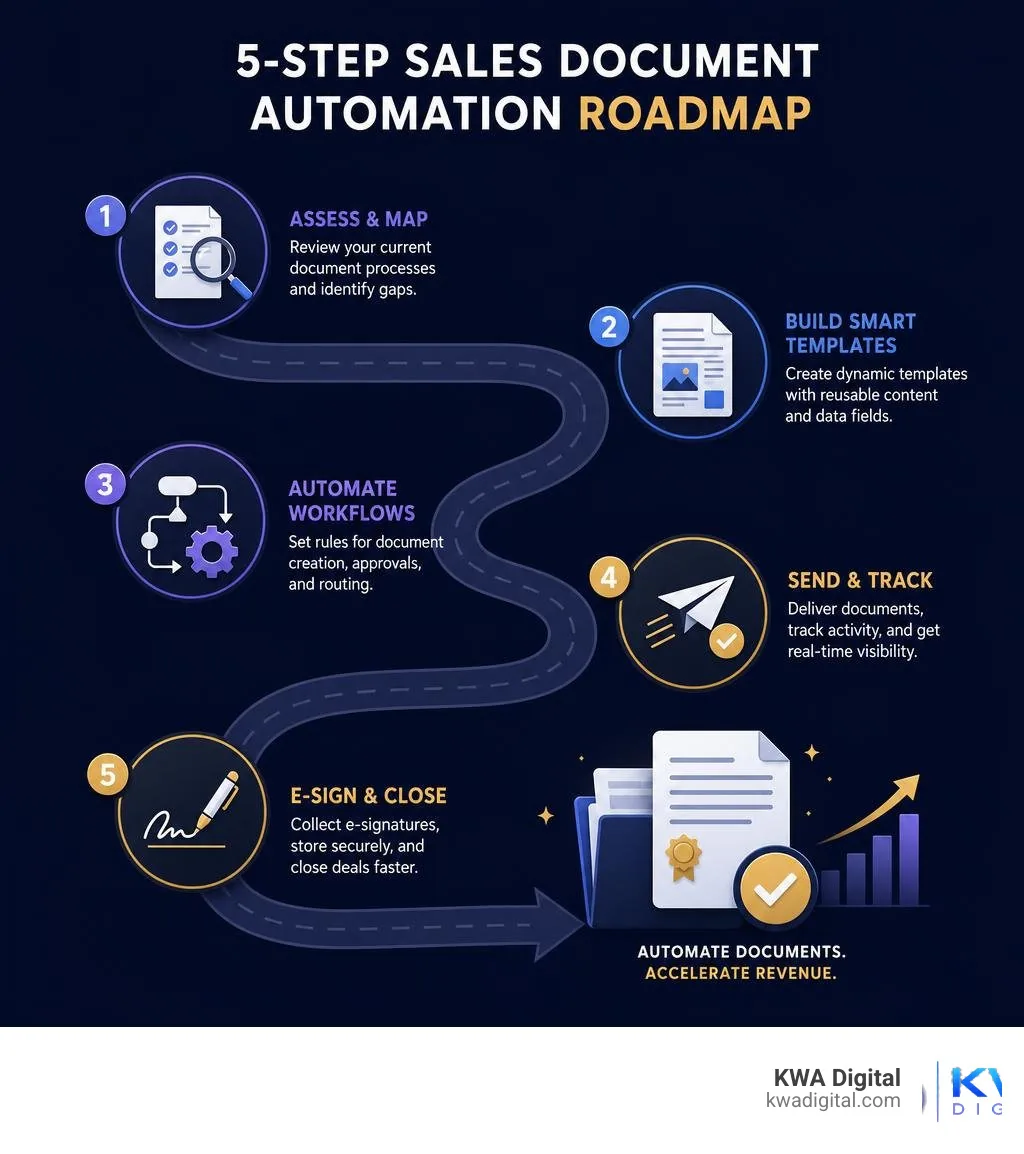
This guide walks you through exactly how to fix it, in five practical steps.
I am Kahin Warsame, founder of KWA Digital, where I help businesses build smarter workflows and connected systems that eliminate exactly these kinds of revenue leaks, including document automation for sales as part of a broader strategy to capture and close more deals without adding headcount. If your sales process still runs on copy-paste and manual follow-ups, you are in the right place.
What is document automation for sales and why it matters in 2026
Sales document automation is the use of templates, business data, workflow rules, approvals, and digital delivery tools to generate sales documents automatically.
Instead of opening last month's proposal, changing the client name, hunting for the right pricing table, and praying you did not leave another customer's details on page seven, your team can generate a polished document from approved data.
In a well-built workflow, sales document automation can pull from:
- CRM records, including contacts, companies, deals, owners, and renewal dates
- CPQ data, including product configurations, pricing, discounts, and terms
- ERP or ecommerce systems, including inventory, tax, billing, and order details
- Approved content libraries, including case studies, product descriptions, legal clauses, and brand assets
- E-signature and storage tools, so documents move from draft to signed without manual chasing
The goal is not just "make documents faster." The goal is to improve the entire revenue workflow from quote to close.
How document automation for sales differs from manual document creation
Manual document creation relies on people remembering the right process every time. Automated document generation relies on systems enforcing the right process every time.
That difference matters.
Manual workflows often include copy-paste, old files, inconsistent formatting, missing approvals, and version confusion. Automated workflows use reusable templates, dynamic fields, conditional logic, approval routing, and audit trails.
| Area | Manual document creation | Automated sales document generation |
|---|---|---|
| Starting point | Blank document or old file | Approved template |
| Data entry | Manually typed or copied | Pulled from CRM, CPQ, ERP, or forms |
| Pricing | Re-keyed by reps | Generated from pricing rules or product catalog |
| Branding | Depends on the user | Locked templates and approved assets |
| Legal language | Copied from previous files | Clause library and conditional rules |
| Approvals | Email threads and reminders | Automated routing by deal rules |
| Tracking | "Did they open it?" guesswork | View alerts and engagement analytics |
| Compliance | Hard to prove | Audit trails, version history, permissions |
| Speed | Minutes to hours, sometimes days | Seconds to minutes after setup |
The big shift is control. Automation lets you move faster without letting every rep become their own designer, lawyer, pricing analyst, and file librarian.
Sales documents you can automate across the buyer journey
If a document uses repeatable structure and data from your systems, it is probably a candidate for automation.
Sales teams commonly automate proposals, quotes, contracts, NDAs, statements of work, order forms, renewal letters, RFP responses, pitch decks, pricing sheets, product comparison documents, invoices, handoff notes, account summaries, deal briefs, pipeline reports, and commission or distribution agreements.
If you are just starting, automate the documents that are both frequent and painful. A good first list is:
- Quotes
- Proposals
- Contracts
- Order forms
- NDAs
- Renewal letters
- Handoff notes
These usually create the most friction because they combine customer data, pricing, terms, approvals, and deadlines.
Why manual paperwork slows down revenue teams
Manual sales documents slow teams down in several ways.
First, they reduce selling time. If reps spend most of the day on admin, they have less time for discovery calls, follow-ups, negotiation, and relationship-building.
Second, manual data entry creates errors. One wrong price, date, product name, or legal clause can delay a deal or create risk.
Third, approvals get stuck. A discount exception might sit in someone's inbox while the buyer is ready to move. The buyer does not care that your internal approval process has gone on a spiritual retreat.
Fourth, manual document chasing creates customer friction. Buyers expect fast service. Research shows that 72% of customers value fast service, and 76% prefer businesses that offer strong data security. Slow, inconsistent, or insecure document workflows work against both expectations.

Step 1: Map the sales document workflow before you automate
Before automating anything, map how documents move through your sales process today.
This means looking at:
- Which documents are created at each deal stage
- Who owns each document
- Where the data comes from
- Who reviews and approves it
- Which systems are involved
- Where delays happen
- Where errors are most common
- Where signed documents are stored
- What happens after signature
This is the step teams are tempted to skip. Do not skip it. Automating a broken process just makes the broken process faster. That is not transformation. That is a high-speed paperwork blender.
Identify high-volume and high-friction documents
Start with documents that are either created often or slow down important deals.
Ask your sales team:
- Which documents take the longest to create?
- Which documents require the most revisions?
- Which documents involve legal, finance, or manager review?
- Which documents cause the most buyer questions?
- Which documents are easiest to get wrong?
- Which documents do reps avoid until the last possible minute?
Also ask RevOps, finance, and legal where they see issues. Sales reps may feel the pain of slow documents, but operations teams often see the hidden cost: inconsistent pricing, missing data, approval gaps, duplicate files, and messy handoffs.
A proposal that takes three hours once a quarter is annoying. A quote that takes 30 minutes and happens 300 times a month is a revenue leak.
Define the source of truth for every document field
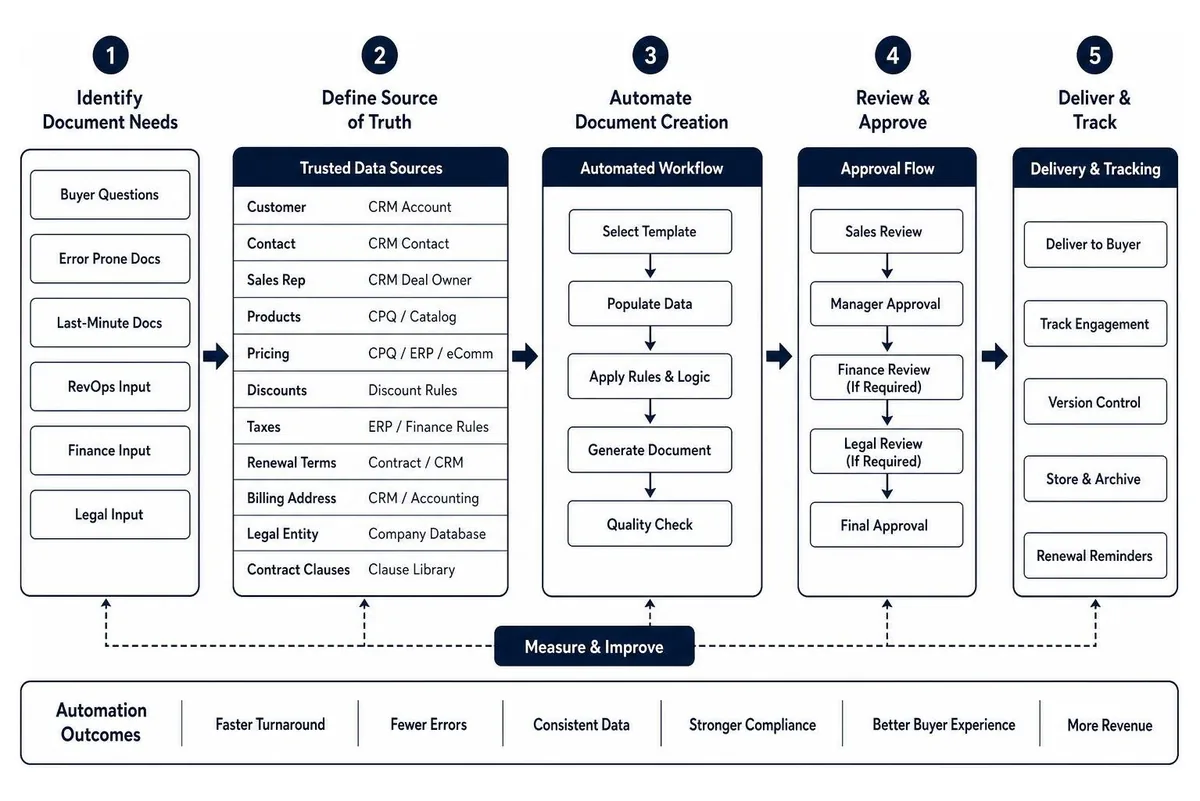
Every automated document needs trusted data.
For each field in your quote, proposal, or contract, define where that information should come from.
Examples:
- Customer name: CRM account record
- Main contact: CRM contact record
- Sales rep: CRM deal owner
- Products: CPQ or product catalog
- Pricing: CPQ, ERP, or ecommerce system
- Discounts: approved discount rules
- Taxes: ERP or finance rules
- Renewal terms: contract record or CRM field
- Billing address: CRM or accounting system
- Legal entity: approved company database
- Contract clauses: legal clause library
If your systems are disconnected, automation will expose that quickly. That is a good thing. At KWA Digital, we often help teams connect marketing, ecommerce, sales, and operations systems so the right data flows into the right workflow. You can learn more about that side of the work in our guide to ecommerce and systems integration.
Set measurable automation goals
You need a baseline before you can prove ROI.
Track your current numbers before automation: average proposal creation time, quote turnaround time, contract approval time, document error rate, documents sent per month, signature turnaround time, close rate, sales cycle length, admin hours per rep, cost per document, and customer acquisition cost.
Then set specific goals, such as:
- Reduce proposal creation time by 50%
- Cut quote turnaround from days to hours
- Reduce approval time by 30%
- Increase documents sent per rep
- Reduce manual errors
- Improve close rate
- Save 10 hours per rep per week
- Shorten time from verbal yes to signed contract
Industry benchmarks suggest automation can reduce overall costs by 10-15%, and early adopters of sales automation often report 10-15% efficiency gains with sales increases of up to 10%. Your numbers will depend on volume, complexity, adoption, and integration quality.
Step 2: Build smart templates for proposals, quotes, and contracts
Once the workflow is mapped, build templates that do the heavy lifting.
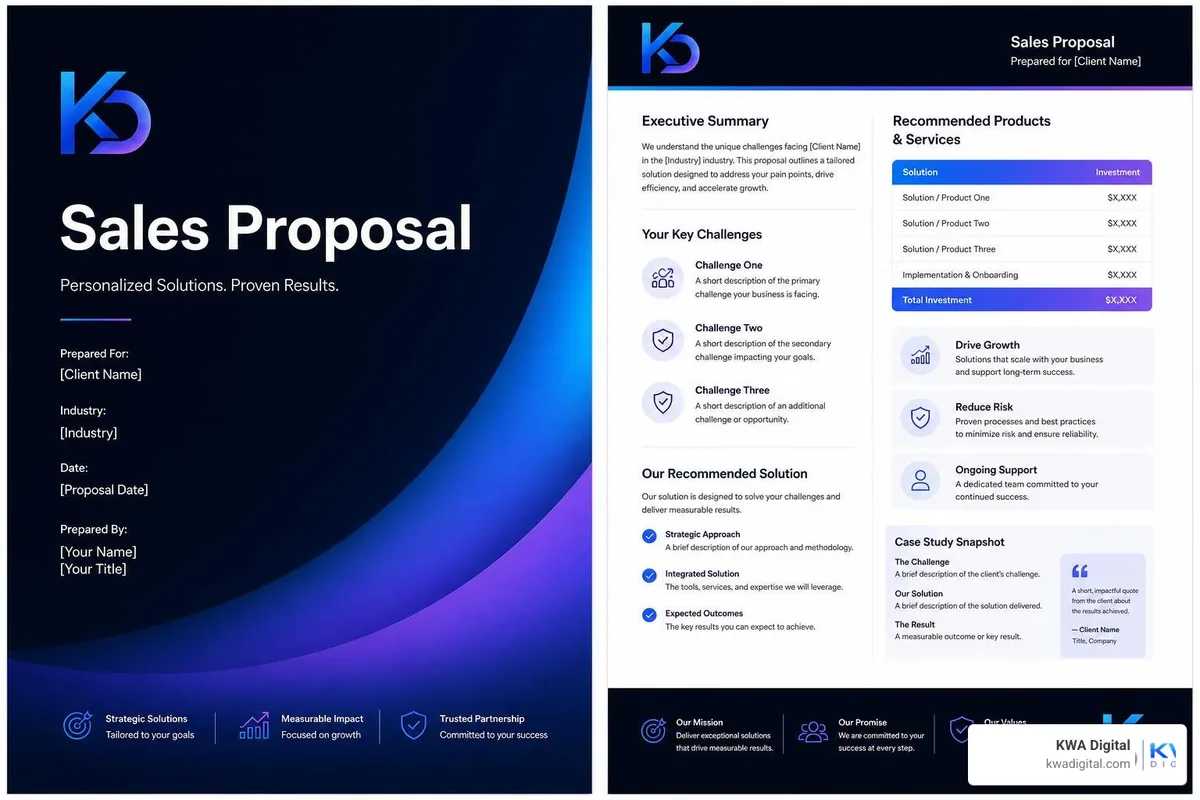
A smart template is not just a pretty document. It is a controlled system for producing accurate, on-brand, personalized sales content.
Your template library may include proposal templates by product or industry, quote templates by pricing model, contract templates by region or customer type, NDA and SOW templates, renewal templates, RFP response sections, approved case study blocks, product description blocks, legal clause libraries, pricing tables, payment terms, and signature blocks.
The key is reusable structure plus dynamic data.
Use dynamic fields and conditional logic
Dynamic fields are placeholders that automatically fill with data: customer name, company name, sales rep, product name and specifications, quantity, unit price, discount, total price, contract start date, renewal date, and billing terms.
Conditional logic controls what appears based on deal details.
For example:
- If the customer is in a specific region, use the correct regional terms
- If the deal includes implementation, add onboarding scope
- If the discount is above a threshold, trigger approval
- If the customer is enterprise-level, include the enterprise support clause
- If the quote includes recurring and one-time fees, separate them into different tables
- If a product is selected, include the matching technical specifications
This is where automation becomes genuinely useful. Instead of reps deciding what to include every time, the system follows approved rules.
Standardize brand consistency and personalization
Customers notice the details. Research shows 65% of customers appreciate personalized correspondence that reflects brand identity while still including individual client details.
That is exactly what good automation supports.
Your templates should lock down logo placement, brand colors, fonts, header and footer styles, proposal structure, product naming, approved claims, legal disclaimers, tone of voice, and visual hierarchy.
At the same time, they should personalize the client name, industry, pain points, recommended solution, relevant products or services, pricing, case study sections, and contract terms.
The best sales documents feel personal without being manually rebuilt from scratch. Think tailor-made suit, not "I found this blazer in the office cupboard."
Protect accuracy, compliance, and security
Sales documents often contain sensitive data: pricing, payment terms, customer information, legal commitments, product details, and signatures.
Automation should strengthen control, not weaken it.
Look for workflows that support role-based access, template permissions, approval records, version history, audit trails, encryption, secure storage, legal clause control, regional compliance rules, data retention policies, and e-signature compliance.
For e-signatures, common legal frameworks include UETA and ESIGN in the United States. If your business handles EU personal data, GDPR considerations matter. If payments are embedded in the workflow, PCI-DSS requirements may apply.
Security also matters to buyers. Since 76% of customers prefer businesses with strong data security, your document workflow is part of the customer experience, not just an internal process.
Step 3: Connect CRM, CPQ, e-signature, and storage systems
This is where document automation for sales becomes a connected revenue engine.
A document tool by itself can help. But the real value appears when your CRM, CPQ, e-signature, cloud storage, and operational systems talk to each other.
Common integrations include:
- CRM for contacts, accounts, deals, owners, and stages
- CPQ for configurations, pricing, quotes, and discount logic
- ERP for billing, tax, inventory, or order data
- E-signature for legal signing and reminders
- Cloud storage for final files
- Accounting or payment systems for quote-to-cash
- Project management or customer success systems for handoff
How CRM and CPQ integrations automate document creation
CRM and CPQ integrations remove manual re-keying.
A typical automated flow looks like this:
- A sales rep updates the opportunity in the CRM.
- Products and pricing are configured in CPQ or a pricing system.
- The rep chooses the right document template.
- The system fills in customer, product, pricing, and terms data.
- Conditional logic adds the right sections and clauses.
- Approval routing starts if needed.
- The approved document is sent for signature.
- The signed document is saved back to the CRM or repository.
This creates a single-source-of-truth workflow. The rep is not copying fields from one tab to another. The document reflects the current deal data. If your store and CRM are not connected yet, start with our guide to ecommerce CRM integration; the document layer builds directly on that foundation.
For complex sales, this is especially important. Quotes communicate price, but proposals communicate value. If you sell configurable products or services, automated proposal generation can include technical specs, pricing, terms, supporting content, and relevant scope details directly from the configuration.
How e-signature integrations accelerate deal closure
E-signature integrations remove one of the most frustrating end-of-deal delays: "Can you print, sign, scan, and send this back?"
In 2026, that sentence should be retired with dial-up internet.
E-signatures help by enabling secure signing links, mobile signing, automatic reminders, signing order control, identity and timestamp records, signed copies sent to all parties, automatic CRM status updates, and faster handoff to finance or fulfillment.
When a buyer is ready to sign, friction matters. A digital signature workflow can turn a verbal yes into a completed agreement faster, especially when reminders and status updates happen automatically.
Where finished documents should live after signing
Automation should not end when the document is signed.
A signed contract should be stored where the business can find and use it: CRM account or deal attachments, shared drives, a contract repository, customer records, finance systems, customer success tools, or renewal tracking systems.
Use clear naming rules covering customer name, document type, deal name, effective date, version, and signed status.
You can also use workflow triggers after signing:
- Update deal stage to closed won
- Notify finance
- Create onboarding task
- Send customer success handoff
- Generate invoice
- Start renewal countdown
- Store signed copy in the correct folder
This is how a document workflow becomes an operations workflow.
Step 4: Add AI and workflow automation without losing control
AI is changing sales document automation quickly. But the goal is not to let AI freestyle your legal terms like it is writing a poem about quarterly revenue.
The goal is controlled acceleration.
AI and machine learning can help create, review, summarize, validate, and optimize documents while still using approved data and human oversight. The same guardrail thinking applies across your wider marketing automation stack.
The role of AI in modern document automation for sales
AI can support sales document workflows in several practical ways:
- Drafting account summaries from CRM data
- Creating deal briefs from notes, emails, and meeting transcripts
- Generating first drafts of proposals or SOWs
- Suggesting relevant case studies or product sections
- Summarizing RFP requirements
- Extracting key terms from customer documents
- Reviewing documents for missing fields
- Flagging unusual discounts or terms
- Checking for brand or compliance issues
- Recommending follow-up timing based on buyer engagement
Modern AI document workflows can pull context from CRM records, emails, call transcripts, previous deals, and approved content libraries. That context can make documents more relevant and reduce the time reps spend writing from scratch.
But AI should verify against trusted data. Prices, dates, legal terms, and product specifications should come from systems of record, not from AI guesses.
Use approvals and guardrails for non-standard deals
Automation should make standard deals fast and non-standard deals safe.
Use approval workflows for discounts above approved thresholds, custom payment terms, non-standard legal clauses, unusual contract lengths, enterprise commitments, region-specific requirements, high-value deals, finance exceptions, and security or compliance changes.
Conditional routing can send the document to the right reviewer automatically. For example:
- Manager approval for discount exceptions
- Finance approval for payment terms
- Legal approval for contract edits
- Operations approval for unusual delivery scope
- Compliance review for regulated industries
This keeps control in the system instead of buried in email threads.
Track engagement and optimize follow-up timing
Document tracking helps sales reps follow up when buyers are actually engaged.
Useful analytics include document opens, time spent in the document, page or section views, pricing table engagement, forwarding activity, comments, signature status, approval status, and reminder activity.
If a buyer opens the proposal three times and spends five minutes on pricing, that is a better follow-up signal than "just checking in."
Tracking also helps leaders improve templates. If buyers never view a certain section, shorten it. If pricing pages get heavy attention, make them clearer. If proposals stall after legal terms, review that language.
Step 5: Measure ROI and scale sales document automation
Once the pilot is working, measure the impact and scale carefully.
Do not roll out everything at once if your team is new to automation. Start with one workflow, prove value, then expand.
A practical rollout path:
- Automate one high-friction document.
- Connect it to CRM data.
- Add e-signature.
- Add approval routing.
- Track time saved and errors reduced.
- Gather rep feedback.
- Improve the template.
- Expand to the next document type.
Benefits of automating sales documents
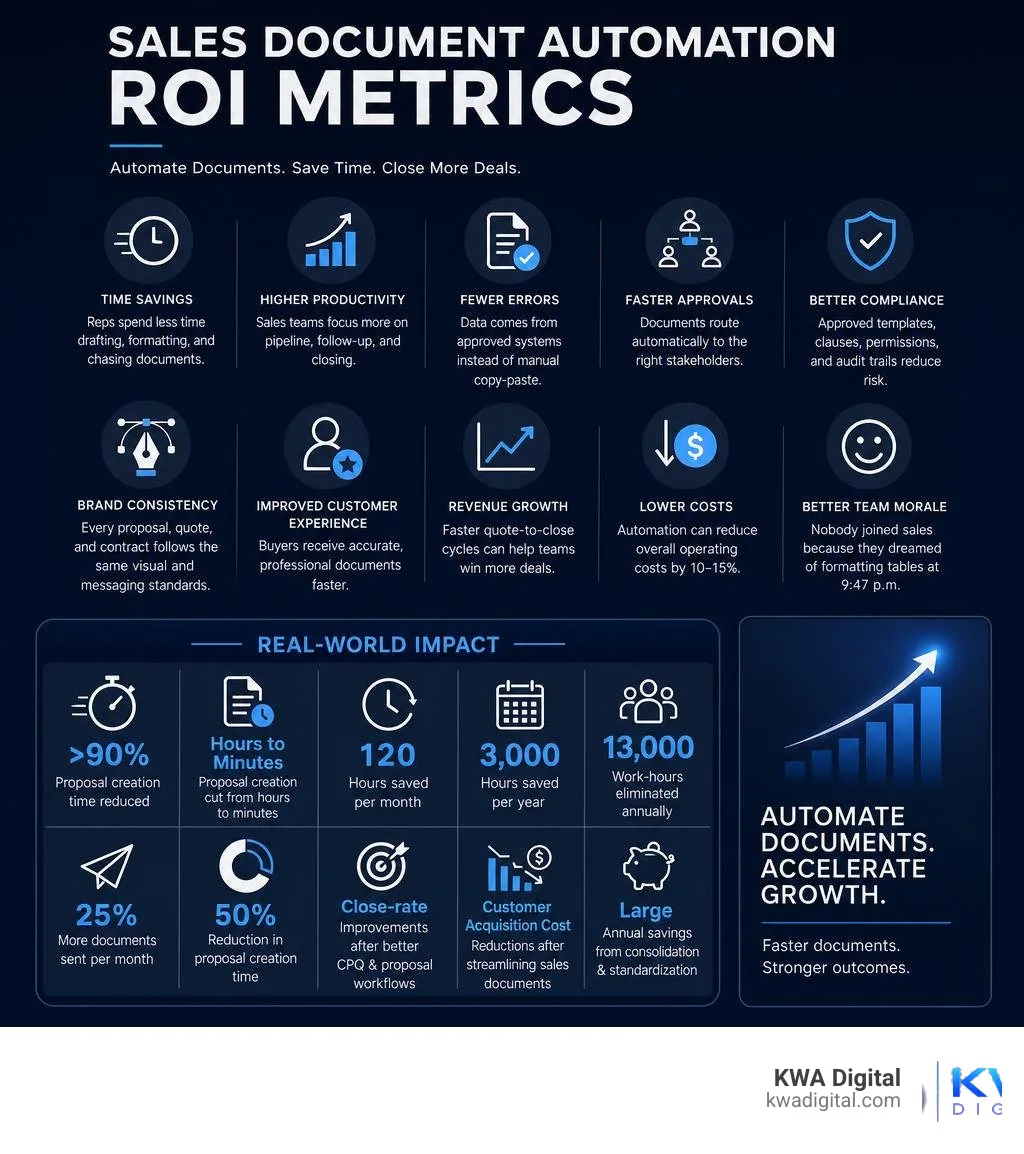
The main benefits include:
- Time savings: Reps spend less time drafting, formatting, and chasing documents.
- Higher productivity: Sales teams can focus more time on pipeline, follow-up, and closing.
- Fewer errors: Data comes from approved systems instead of manual copy-paste.
- Faster approvals: Documents route automatically to the right stakeholders.
- Better compliance: Approved templates, clauses, permissions, and audit trails reduce risk.
- Brand consistency: Every proposal, quote, and contract follows the same visual and messaging standards.
- Improved customer experience: Buyers receive accurate, professional documents faster.
- Revenue growth: Faster quote-to-close cycles can help teams win more deals.
- Lower costs: Automation can reduce overall operating costs by 10-15%.
- Better team morale: Nobody joined sales because they dreamed of formatting tables at 9:47 p.m.
Fast service also matters to customers. With 72% of customers appreciating fast service, document speed can directly influence buyer confidence.
Real-world ROI examples from sales document automation
Across the market, published automation results show what is possible when teams replace manual document work with connected workflows.
Reported outcomes include:
- Proposal creation time reduced by more than 90%
- Proposal creation cut from hours to minutes
- 120 hours saved per month through faster proposal workflows
- 3,000 hours saved per year in document processes
- 13,000 work-hours eliminated annually through quotation automation
- 25% more documents sent per month
- 50% reduction in proposal creation time
- Close-rate improvements after better CPQ and proposal workflows
- Customer acquisition cost reductions after streamlining sales documents
- Large annual savings from consolidating templates and standardizing document generation
These results are not automatic. They depend on good process design, clean data, strong adoption, and the right integrations. But they show why document automation is often one of the fastest operational improvements a sales team can make.
How to choose the right sales document automation platform
Choosing the right platform depends on your sales process, tech stack, document complexity, and compliance needs.
Must-have features include CRM compatibility, CPQ compatibility if pricing is complex, template controls, dynamic fields and merge tags, conditional logic, reusable content blocks, pricing tables, a clause library, approval workflows, e-signature integration, document tracking and analytics, role-based permissions, audit trails, secure storage, API access, no-code workflow options, cloud storage integration, version control, mobile-friendly sending and signing, good support, and scalability across teams, regions, and product lines.
Also ask these questions:
- Can it pull data from our CRM without manual copying?
- Can it support our pricing and approval rules?
- Can sales reps use it without heavy training?
- Can RevOps control templates and permissions?
- Can legal approve standard clauses?
- Can we track document engagement?
- Can signed files be stored automatically?
- Can it scale as our sales process grows?
- Can it connect to the rest of our operations?
At KWA Digital, we care deeply about connected systems. A document workflow should not live on an island. It should connect your website, CRM, marketing, sales, operations, and reporting into one revenue system.
Frequently asked questions about sales document automation
What is the fastest way to start with document automation for sales?
The fastest way is to pilot one high-volume document, usually a quote or proposal.
Start with:
- One document type
- One approved template
- A small set of CRM fields
- One e-signature workflow
- One clear success metric, such as creation time or signature turnaround
Do not begin with your most complex enterprise contract. Start with a repeatable workflow where the team can feel the benefit quickly.
Does sales document automation replace CRM or CPQ software?
No. Sales document automation usually works with CRM and CPQ systems.
Think of it this way:
- CRM stores customer, account, and deal data.
- CPQ handles product configuration, pricing, and quote logic.
- Document automation turns that data into polished documents and manages workflow steps like approvals, delivery, signatures, and storage.
So it does not replace CRM or CPQ. It connects them to the documents your buyers actually see and sign.
How long does it take to see ROI from sales document automation?
Many teams can see early ROI during the first pilot, especially if the starting process is manual and repetitive.
Quick wins often come from faster document creation, less copy-paste, fewer errors, shorter approval cycles, faster signatures, and better follow-up timing.
For a meaningful ROI review, measure results monthly. Compare time saved, documents sent, error rates, approval speed, close rate, and sales cycle length against your baseline.
Conclusion
Sales document automation is not just about making prettier proposals. It is about removing friction from the revenue process.
Here is the five-step recap:
- Map your current document workflow.
- Build smart templates for proposals, quotes, and contracts.
- Connect CRM, CPQ, e-signature, and storage systems.
- Add AI and workflow automation with proper guardrails.
- Measure ROI and scale what works.
When your systems are connected, your sales team can move faster, reduce errors, maintain compliance, and spend more time selling.
That is the real promise of document automation for sales: faster sales cycles without adding more admin work. Documents are also just one stage of the bigger pipeline; for the end-to-end picture from proposal to payment, see our guide to quote-to-cash automation.
If you want help designing a connected sales automation system, explore our services. And if proposals are your biggest bottleneck, start with our focused guide to sales proposal automation, or browse more ideas on our blog.
Your reps should sell, not format tables.
Tell us how your sales documents get made today, and we will show you a working demo of the automated workflow that replaces the copy-paste. Clear scope, honest pricing, no surprises.
Request a free demo