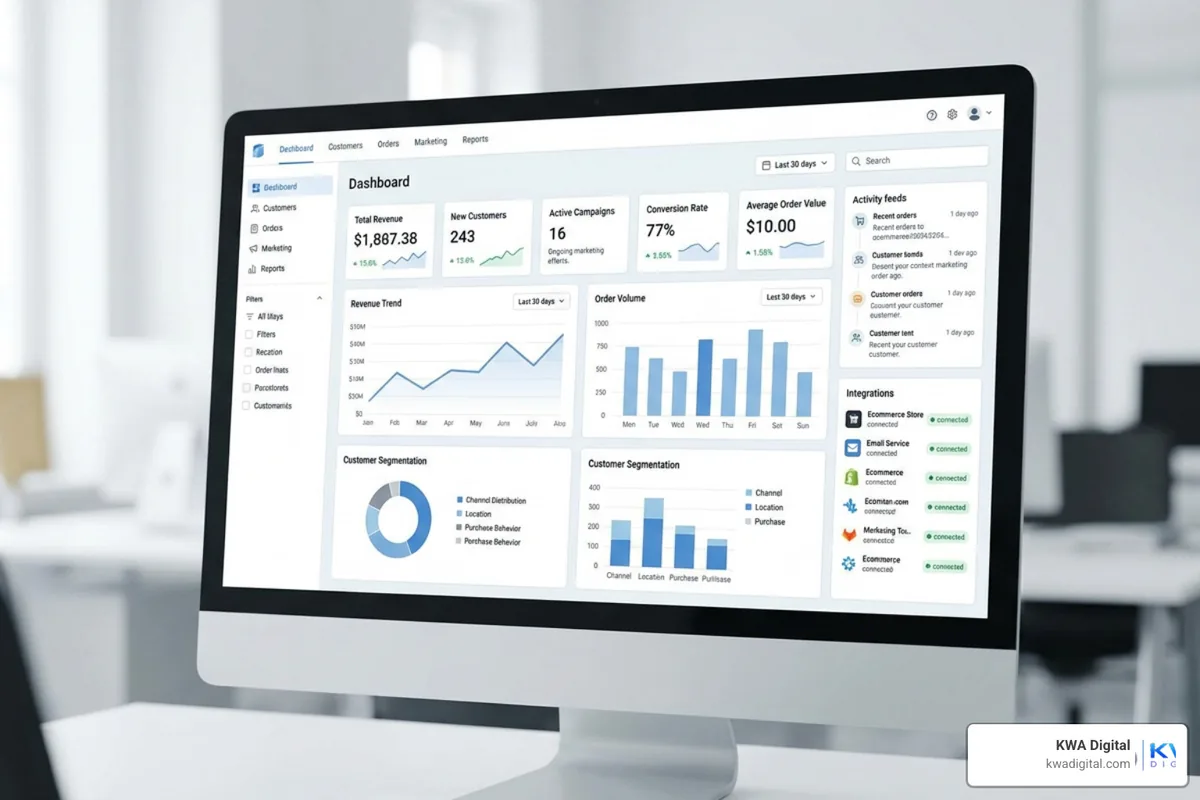
Ecommerce CRM integration is the process of connecting your Customer Relationship Management (CRM) system directly to your online store, so that customer data, orders, browsing behavior, and marketing all flow into one place automatically.
If you are evaluating your options, here is a quick summary:
| What it does | Why it matters |
|---|---|
| Syncs customer data across your store and CRM | Eliminates manual data entry and silos |
| Tracks orders, browsing, and purchase history | Enables personalized marketing at scale |
| Triggers automated workflows (cart recovery, follow-ups) | Converts more customers without extra staff |
| Connects marketing, support, and sales tools | Gives every team a full view of each customer |
| Powers AI-driven insights and recommendations | Helps you predict and respond to customer needs faster |
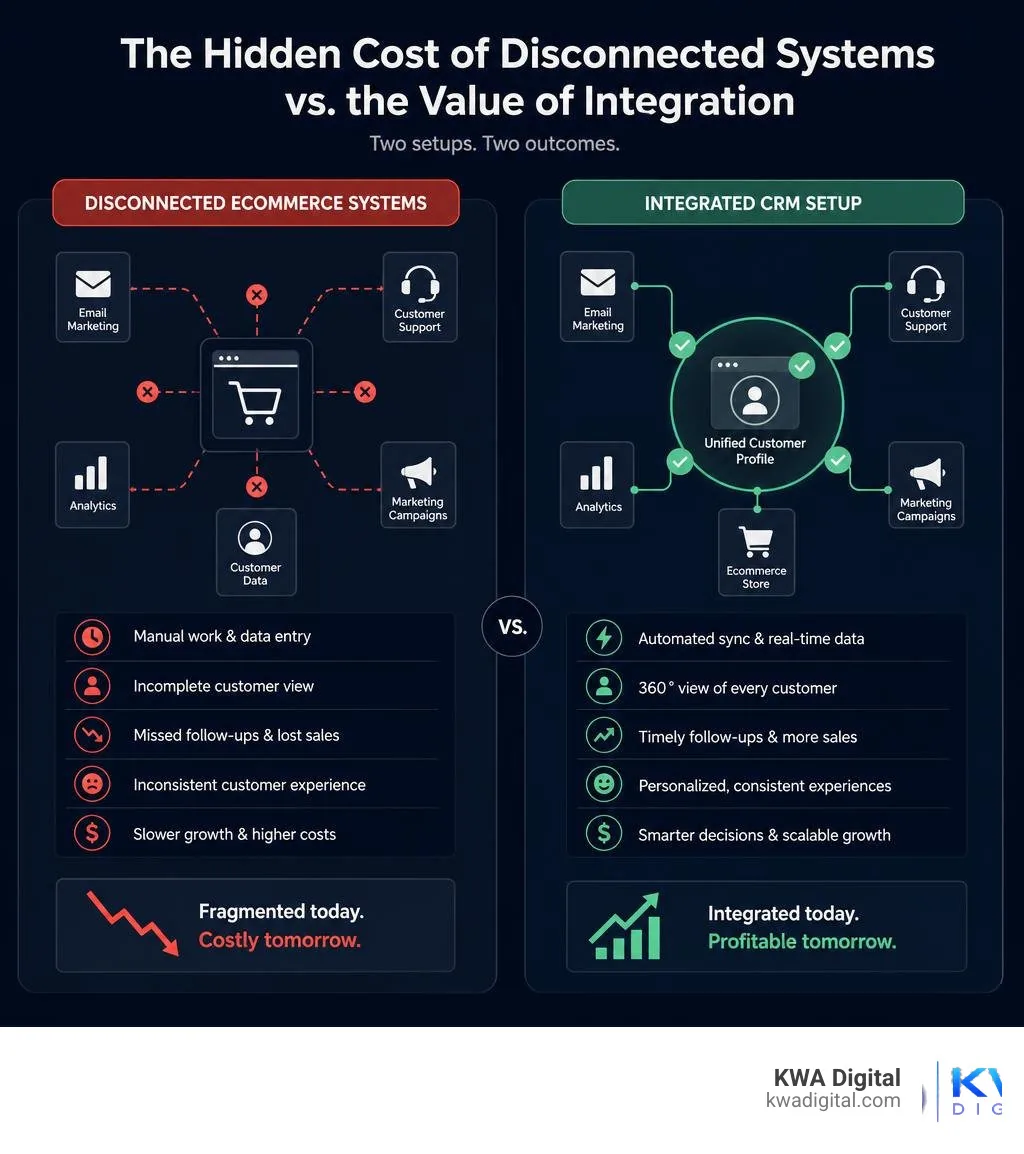
Most small ecommerce businesses are running on disconnected tools. Your store lives in one place, your email list in another, your customer support in a third. The result? Leads fall through the cracks, follow-ups do not happen, and you are making decisions without the full picture.
The numbers back this up. The average organization uses over 900 apps, yet only 28% of those applications are integrated. And 81% of IT leaders say data silos are actively slowing down their digital transformation efforts.
For a small ecommerce business, that fragmentation has a direct cost: missed sales, inconsistent customer experiences, and hours lost to manual work that should be automated.
I am Kahin Warsame, founder of KWA Digital, a web design and business systems agency that specializes in helping businesses solve exactly these problems through ecommerce CRM integration, workflow automation, and connected customer journey systems. In this guide, I will walk you through everything you need to evaluate your options and build a setup that actually works for your business.
What is ecommerce CRM integration?
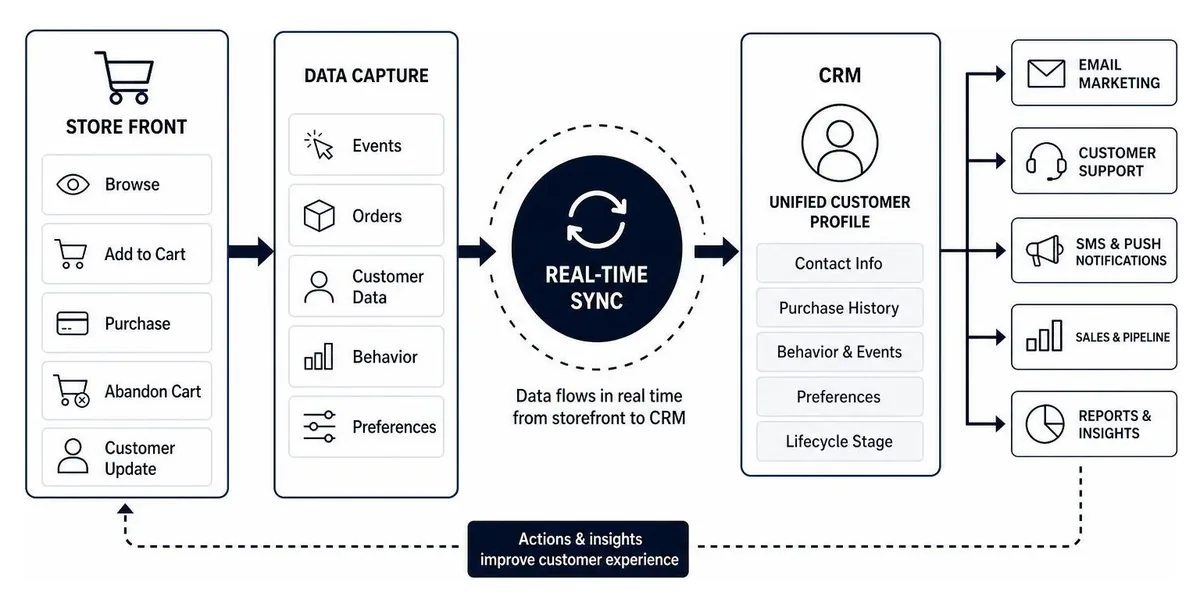
At its core, ecommerce CRM integration is the bridge that connects your customer-facing digital storefront with your backend customer relationship database. Rather than keeping transaction histories locked inside your shopping cart and customer communication histories inside your email marketing tool, integration merges these data pools into a single, real-time customer profile.
As of July 2026, the retail landscape has shifted. Customers no longer view "online shopping" and "customer service" as separate departments; they expect a completely fluid, unified experience. In this environment, a real-time profile must update within milliseconds of a customer action, whether they are abandoning a cart, opening an email, or asking a chatbot about shipping.
Modern platforms have evolved rapidly to meet this demand. The industry's biggest commerce and CRM players are racing to build native customer data platforms (CDPs) and integrated enterprise CRM layers of their own. That focus tells you everything: data consolidation has become the backbone of modern commerce infrastructure.
Why traditional CRMs fail without ecommerce CRM integration
Traditional CRMs were originally built for B2B sales pipelines. They excel at managing high-value, low-volume account relationships, tracking pipeline stages, and logging manual phone calls. However, they fall flat when applied to the speed and volume of B2C ecommerce.
Traditional setups suffer from several fatal flaws when forced into ecommerce without proper integration:
- Account-level focus vs. individual behavior: B2B CRMs focus on "accounts" and "deals," whereas online stores need to track individual consumer behaviors, such as product page views, category preferences, and coupon usage.
- Speed mismatch: Ecommerce demands real-time responses. If a customer abandons their cart, a recovery email needs to go out within an hour. Traditional CRMs often run on batch-processing syncs that only update once a day.
- Channel fragmentation: Without a direct connection, your customer support agents cannot see what is currently in a caller's cart, and your marketing team might send a promotional discount for a product the customer bought at full price ten minutes ago.
- Data silos: When your systems do not talk to each other, you create digital blind spots. This is why 81% of IT leaders report that data silos actively impede their digital transformation and growth efforts.
Key benefits of integrating CRM with your ecommerce platform
When you bridge the gap between your store and your CRM, you stop guessing and start operating with precision. Here are the primary business benefits of executing a successful ecommerce CRM integration:
- A complete 360-degree customer view: Every click, purchase, refund, and support ticket is tied to a single profile. Your team can read your customers "like a book," even without the physical cues of an in-store interaction.
- Operational efficiency: No more manual CSV exports or double-entry of product details. Data moves automatically, freeing your team to focus on growth.
- Fewer abandoned carts: Approximately 18% of cart abandonment is caused by an overcomplicated checkout process or clunky user flows. An integrated CRM helps you identify where friction occurs and automatically trigger recovery sequences to win those customers back.
- Optimized inventory and demand forecasting: By linking sales velocity and customer interest trends directly from your CRM to your operations, you can plan inventory cycles more accurately and reduce carrying costs.
To unlock these benefits, businesses need a cohesive technical strategy. At KWA Digital, we build these exact high-performing, connected systems. Learn more about how we help brands streamline their operations on our services page.
Driving personalization and AI-driven insights
True 1:1 personalization at scale is impossible to achieve manually. However, when your CRM is fed a constant stream of clean, real-time ecommerce data, you can leverage advanced marketing automation and AI agents to do the heavy lifting.
Instead of broad, generic newsletters, integrated systems allow you to build hyper-targeted segments. For example, you can target "customers who spent over $150 in the last 60 days, browsed the outdoor category this week, but have not purchased yet."
This level of targeting drives massive real-world growth. Consider how leading brands utilize consolidated data:
- Consolidating email and SMS marketing into a single customer data platform has allowed top-tier brands to grow total revenue from automated flows by 139% year-over-year.
- Highly segmented campaigns based on precise browsing and purchase patterns can drive up to 70% of an online store's total ecommerce revenue.
- Constant A/B testing and optimization of these integrated flows can yield astronomical returns, sometimes reaching up to a 67x ROI on the technology investment.
In 2026, this has evolved even further with autonomous AI agents. Instead of rigid, pre-built rules, modern AI CRM agents analyze real-time customer behavior, inventory levels, and individual preferences to write and send personalized restock reminders or cross-sell emails completely on their own.
Integration methods and key systems to connect
Choosing how to connect your systems is just as important as choosing the systems themselves. Below is a breakdown of the three primary integration methods:
| Integration method | Pros | Cons | Best for |
|---|---|---|---|
| Native connectors | Fast setup, lower cost, officially supported. | Limited customization, rigid data mapping. | Standard setups (e.g., Shopify to Klaviyo). |
| iPaaS (Integration Platform as a Service) | No-code/low-code, highly visual, connects hundreds of apps. | Monthly subscription costs, potential minor sync delays. | Growing brands with multi-channel requirements. |
| Custom API integration | Infinite flexibility, real-time bidirectional sync, custom fields. | Requires developer resources, higher upfront cost. | Enterprise brands with legacy systems or unique workflows. |
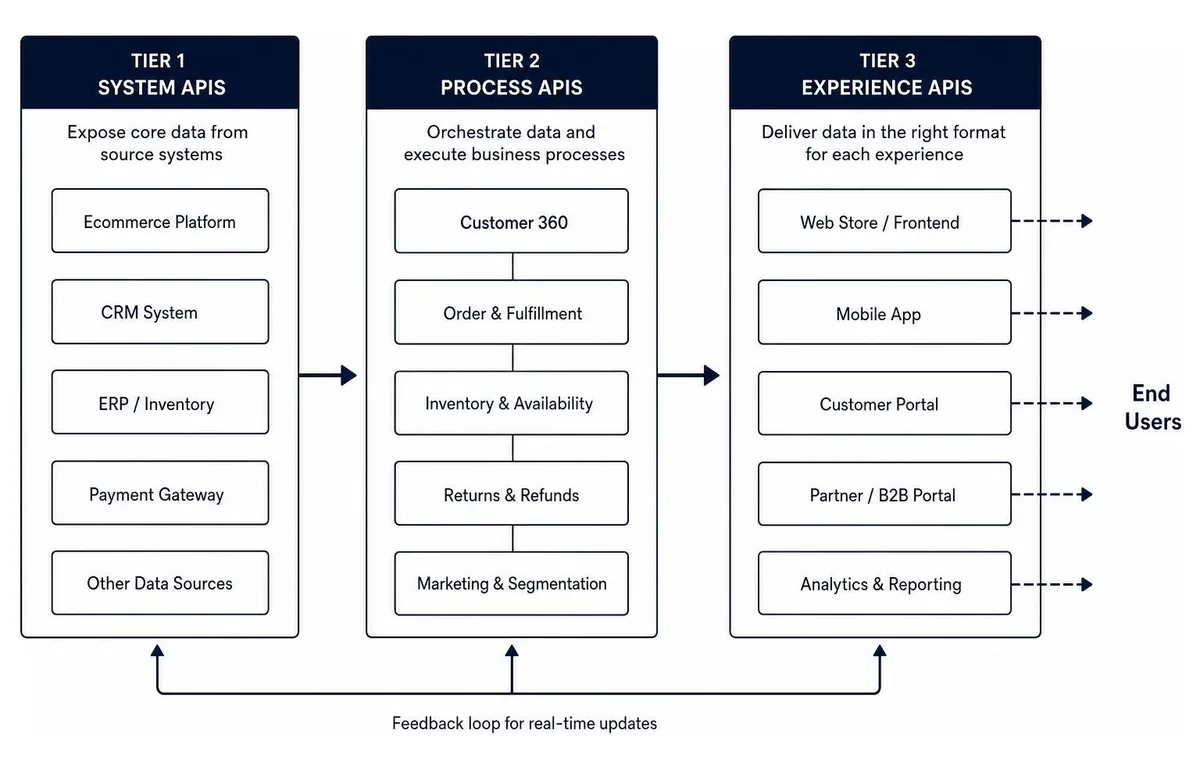
At KWA Digital, we typically advocate for an API-led integration strategy. This involves breaking your integration down into three distinct API tiers:
- System APIs: These talk directly to your core databases (like your ERP or legacy database) and shield you from their technical complexities.
- Process APIs: These combine data across systems to shape business processes (such as taking customer data from the CRM and order data from the storefront to generate a shipping label).
- Experience APIs: These package the processed data into the final format needed for end-user experiences, such as a mobile app dashboard or a customer portal.
This modular structure ensures that if you swap out your storefront or upgrade your CRM in the future, you do not have to rebuild your entire integration from scratch.
Essential systems to connect
To build a truly connected ecosystem, your ecommerce CRM integration should extend beyond just your shopping cart. We recommend connecting several key operational areas:
- Marketing automation: Connect your customer profiles to your marketing engines to trigger automated flows. Dedicated connectors between your marketing platform and your ERP keep product data, stock levels, and marketing messages perfectly synchronized.
- ERP (Enterprise Resource Planning) systems: Integrating your ERP with your CRM ensures your sales team has real-time visibility into stock levels, order tracking, and financial invoicing.
- Open-source storefronts & custom connectors: If you run on open-source platforms like WooCommerce, specialized connector tools can sync customer groups, custom fields, and multi-currency transactions smoothly into CRMs like Zoho or HubSpot.
- Developer frameworks: For custom setups, well-maintained open-source integration frameworks keep your system architecture secure, stable, and compliant with modern web standards.
- Customer support: Connect tools like Zendesk or Gorgias so your support agents can view order histories and tracking links directly alongside customer messages, resolving issues in half the time.
Overcoming challenges and risks
While the rewards are massive, integration does come with risks that must be managed:
- Data mapping complexities: If your CRM expects a phone number format to be "+1-XXX-XXX-XXXX" but your checkout page allows users to type whatever they want, your integration will break. Careful data validation and mapping are required upfront.
- Security and compliance: Handling customer data means you must comply with strict regulations like GDPR and CCPA. Ensure your integrations utilize secure, encrypted endpoints (AES-256) and that access is restricted via multi-factor authentication.
- The "human element" and training: A tool is only as good as the team using it. If your customer service team does not know how to read the newly integrated CRM dashboard, they will continue to ask customers for information they should already have.
- Data duplication: Without strict deduplication rules (such as matching customers strictly by verified email address or unique ID), you risk creating multiple messy profiles for the same customer.
Best practices for a successful ecommerce CRM integration
To ensure your integration project delivers a high return on investment, follow these foundational best practices:
- Define clear objectives first: Do not integrate just for the sake of connecting systems. Write down the exact business outcomes you want to achieve (e.g., "reduce cart abandonment by 5%" or "decrease customer support response times by 30%").
- Clean your data before syncing: Syncing dirty data just means you will have dirty data in two systems instead of one. Clean up duplicate profiles, correct formatting errors, and archive old, inactive contacts before turning on the sync.
- Opt for a demo-first, connected approach: You should not have to guess how your systems will work together. We design fully connected systems that integrate your marketing and operational workflows seamlessly; you can explore how we build them on our services page.
- Provide role-specific training: Do not overwhelm your team with a generic walkthrough of the entire CRM. Train your marketing team on segmentation, your support team on customer profiles, and your operations team on inventory tracking.
- Test and iterate continuously: Run end-to-end tests before going live. Make a test purchase, trigger a refund, submit a support ticket, and verify that every action logs perfectly in the CRM within your target timeframe.
Frequently asked questions about ecommerce CRM integration
How long does a typical integration project take?
The timeline for an ecommerce CRM integration project can range anywhere from 1 to 6 months.
A simple, out-of-the-box native connector (like linking a standard Shopify store to Klaviyo) can be configured and tested in a matter of days. However, a complex enterprise integration involving a custom-built storefront, a legacy ERP system, and deep bidirectional data mapping will require several months of planning, development, and rigorous testing to ensure stability.
How do you measure the ROI of CRM integration?
Measuring success requires tracking both quantitative financial metrics and qualitative operational improvements. We recommend focusing on:
- Time savings: Calculate the hours your team saves by eliminating manual data entry, manual CSV exports, and cross-departmental back-and-forth.
- Customer retention rate: Track whether personalized follow-up campaigns and faster customer service lead to more repeat purchases.
- Average order value (AOV): Monitor if AI-driven product recommendations and targeted cross-sell flows successfully increase cart sizes.
- Software cost reduction: Consolidating your tech stack often allows you to eliminate redundant third-party apps, saving up to 18% or more in software licensing fees.
What is the difference between a CRM and an ERP?
While both systems are vital to a growing ecommerce business, they serve completely different functions:
- CRM (Customer Relationship Management): This is your "front-office" tool. It houses customer-centric data, including contact information, support tickets, email interactions, and browsing behavior. Its primary goal is to drive sales, marketing, and customer satisfaction.
- ERP (Enterprise Resource Planning): This is your "back-office" tool. It manages physical and operational processes, including inventory levels, supply chain logistics, manufacturing, human resources, and core financial accounting.
Integrating the two ensures that your customer-facing teams have real-time access to operational realities (like stock levels), while your operational teams can plan ahead based on real-time sales demand.
Conclusion
In the modern digital landscape, running an ecommerce business with disconnected systems is like trying to steer a ship in a fog. You might make progress, but you are constantly guessing where the obstacles and opportunities lie.
Integrating your ecommerce platform with a robust CRM eliminates the guesswork. It breaks down data silos, automates repetitive manual tasks, and unlocks the hyper-personalized shopping experiences that modern consumers expect.
At KWA Digital, we specialize in removing the technical complexity from this process. We take a demo-first approach to design fully connected systems that seamlessly tie your marketing, design, and operations together to convert traffic into predictable revenue.
Ready to stop wrestling with disconnected tools and start growing your business with a unified system? Explore our guide to ecommerce integration software, learn how to connect your store to QuickBooks or Xero, or if you are still deciding whether a CRM is right for you, start with our guide on whether your small business needs a CRM. You can also get in touch with our team today to see how we can help you build a high-performing digital ecosystem.
One store. One CRM. One system.
Tell us which tools you run today, and we will show you a working demo of how they connect into a single customer view. Clear scope, honest pricing, no surprises.
Request a free demo