KWA Digital was brought in through Mandek Consulting to build the online learning platform for the Digital Ambassadors programme, a national digital-skills initiative run for a chamber of commerce and industry. We set up Moodle from scratch, from the server through to the theme and branding, built the programme website, and loaded the course content. Once the first platform was live, we cloned it for three more countries and set each one up for its own programme.
The programme's course content and policy decisions belonged to the client and its partners. Everything underneath was ours: the server, the platform, its configuration, the course structure, the progress tracking, the look and feel, the website, and the rollout to the other countries.
At a glance
| Client | Mandek Consulting |
|---|---|
| Programme | Digital Ambassadors (national digital-skills training) |
| End beneficiary | A national chamber of commerce and industry, with international programme partners |
| Engagement | Sub-contracted technical delivery |
| KWA Digital's role | Built and configured the learning platform and the programme website, then rolled the platform out to three more countries |
| Scope | Server setup, Moodle installation and configuration, plugins and webhooks, user roles and enrolment, completion tracking, content loading, theming and branding, programme website, three country rollouts, documentation, support |
| Platform | Open-source Moodle LMS |
| Status | Live in four countries and in active use |
A note on scope: KWA Digital built the platforms and the website. The course curriculum and programme decisions came from the client and its partners. Learner names and any private data have been kept out of this write-up entirely.
The context
The Digital Ambassadors programme trains people in foundational digital skills at scale, with the teaching delivered online. That needs a learning platform that works for two very different groups at once. Learners need a clear path through the material and should never have to wonder what comes next. Administrators need to enrol people, run cohorts, and see at a glance who has done what.
The work came to us through Mandek Consulting, who held the client relationship and brought KWA Digital in as the technical delivery partner. Our job was to stand the whole platform up properly from day one, and later to repeat it for the programme's other countries.
What KWA Digital built
Moodle's engine already handles the hard parts of running a training programme: accounts, roles, enrolment, activities, grades, and reporting. The work was in setting all of it up well, making it the programme's own, and making it repeatable.
1. Set up the server and Moodle from scratch
We set up the server, installed Moodle, and configured it from the ground up, including the plugins and webhooks the programme needed, and a custom plugin that lets learners activate an account in a separate system the programme uses. Nothing was inherited, so every decision about how the platform behaves was made deliberately for this programme.
2. Configured users, roles, and enrolment
Learners and administrators need to see and do different things. We set up the user roles and user management, and configured how learners get in: they create their own accounts through email self-registration and enrol themselves in the programme, while administrators can still create staff accounts by hand.
3. Structured the course and loaded the content
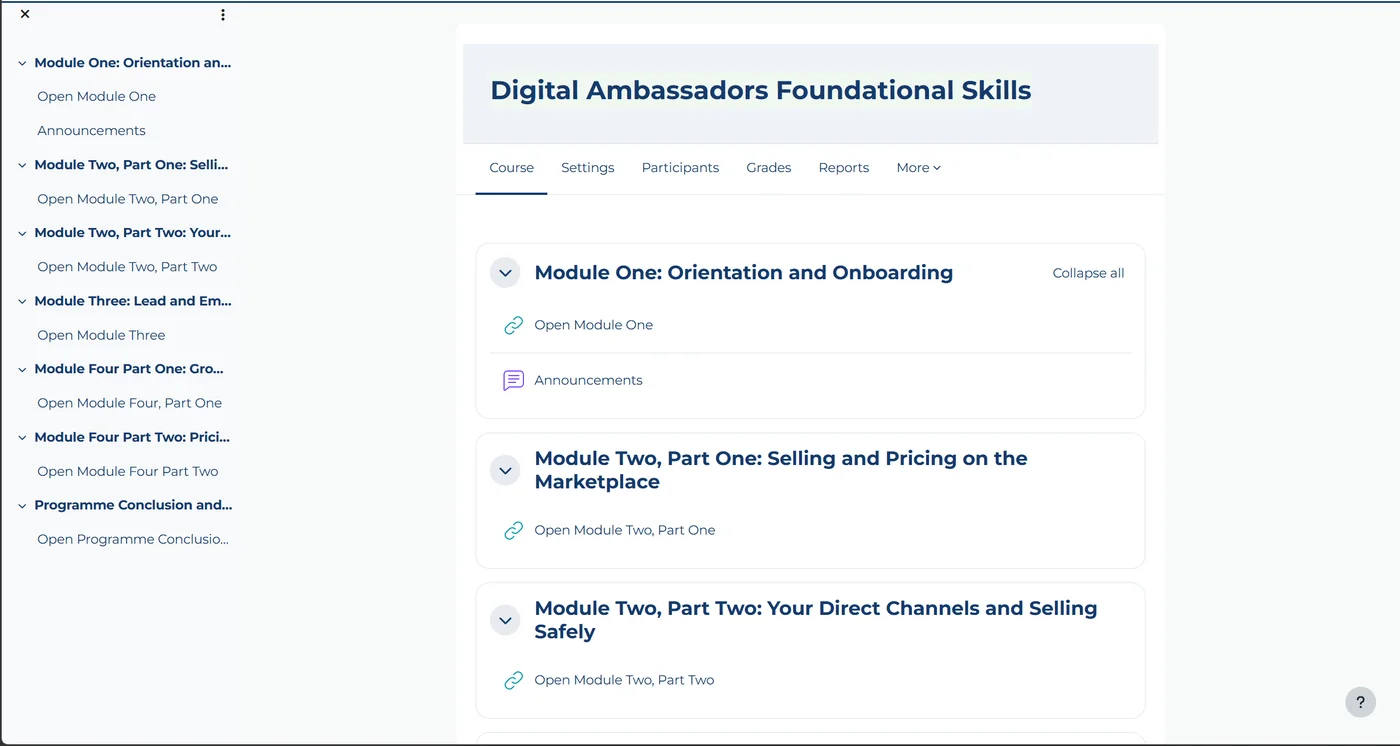
A learning platform lives or dies on whether a learner knows what to do next. We built one visible programme course that leads into separate module courses, running from orientation and onboarding through the core modules to a programme conclusion, and loaded the programme's content into them. Each module unlocks automatically when the previous one is complete, through six completion-based enrolment rules, so learners move through in order without anyone moving them along by hand. The course hub at the top of this page is the entry point learners see.
4. Built in completion tracking
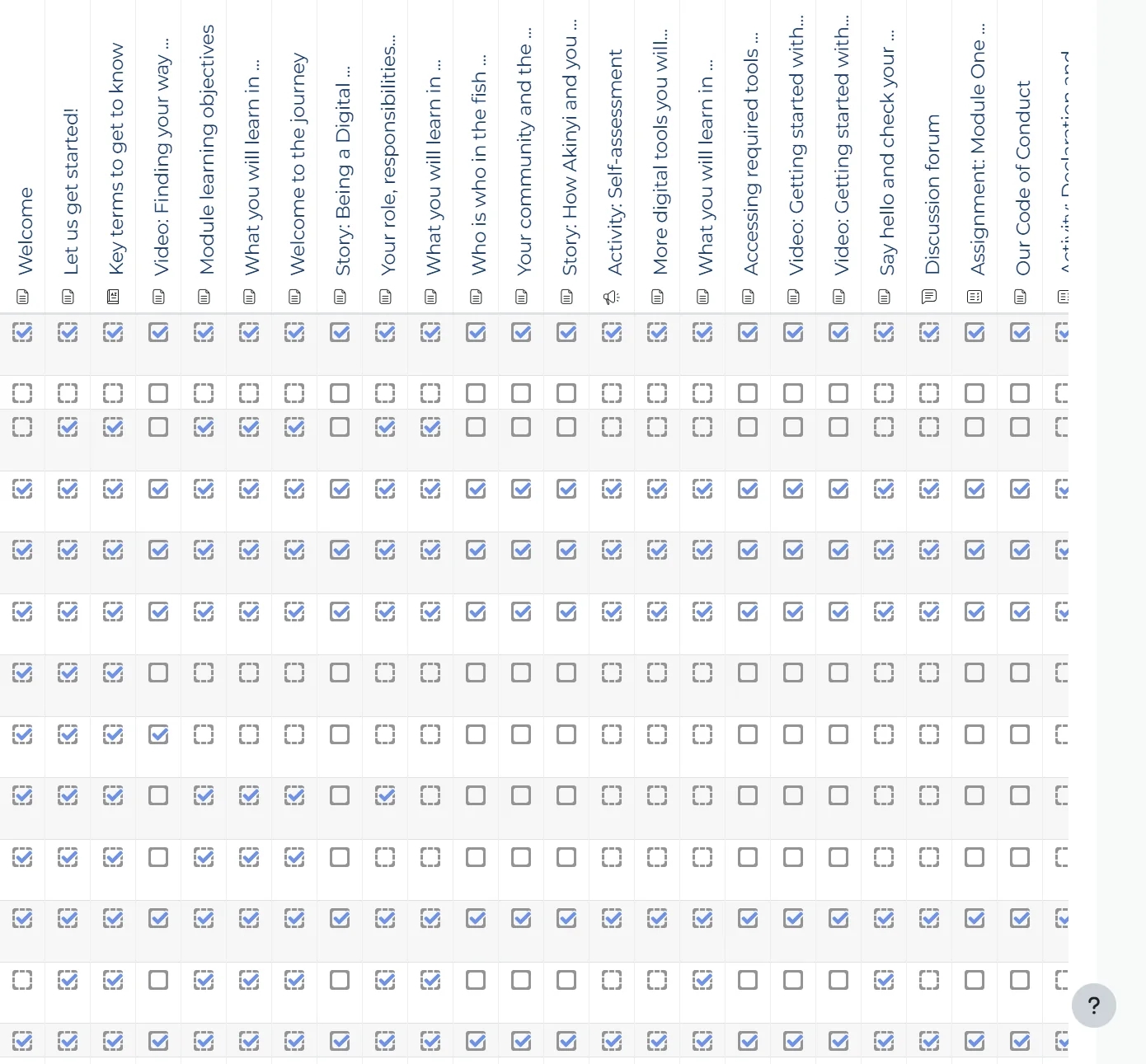
Both audiences need to see progress. We set up activity completion across the course, so a learner can see what they have finished and administrators can see every learner's progress across every activity in one view.
5. Themed and branded the platform
We themed and branded Moodle so it looks like the programme rather than generic software. This is the lighter of the two ways to make Moodle your own: the platform keeps Moodle's standard layouts and flow, dressed in the programme's identity.
6. Built the programme website
Alongside the platform, we built the programme's website from scratch, the public front door that introduces Digital Ambassadors before anyone logs in to learn.
7. Cloned the platform for three more countries
Once the first platform was live and working, the programme expanded. Because the original was built cleanly and deliberately, we could clone it for three more countries and set each one up for its own programme, instead of starting from nothing three more times. That is the payoff of doing the first build properly: it becomes a template.
8. Documented it and supported it
We wrote down how the platforms are configured and run day to day, so operating them does not depend on any one person being available, and so the client's own team can take them over. Across the engagement, KWA Digital was also the technical point of contact as cohorts moved through the material, solving issues as they came up.
What was delivered
| Piece | What it does |
|---|---|
| Server and Moodle, set up from scratch | Runs the programme's learning, accounts, and reporting |
| Roles, user management, and enrolment | Puts the right people in the right course with the right access |
| One sequenced course path, content loaded | Takes learners from orientation to conclusion with no guesswork |
| Completion tracking | Shows learners and administrators exactly where everyone stands |
| Theme and branding | Makes the platform look like the programme, not generic software |
| Programme website | Introduces the programme before anyone logs in |
| Three country rollouts | The same proven platform, set up for each new country |
| Written documentation | Lets the platforms be run and handed over without relying on memory |
The outcome
The Digital Ambassadors programme launched on a platform built for it rather than adapted to it, and then grew into three more countries on the same foundation. The course reads as one clear path, the completion data gives administrators a reliable picture of every cohort, and how it all runs lives in documentation rather than in anyone's head.
What is next
A live platform is never truly finished, and several improvements are on the roadmap rather than delivered. We list them as future work on purpose:
- Integrated live chat support so learners can get help in the moment.
- A dedicated transactional email setup for reliable, deliverable platform notifications.
- Automated completion certificates issued as learners finish the path.
- Onboarding of additional learner cohorts as the programme scales.
- Full operational handover to the client's own team, which the documentation is built to enable.
The takeaway
Most problems people have with learning platforms trace back to how they were set up: a course with no clear path, progress nobody can see, and a configuration only one person understands. Setting Moodle up properly from the start avoids all three, and it pays off again later. We wrote up the full setup, including the stack, plugins, and traps, in how to set up Moodle properly. Because this platform was built cleanly once, it became a template the programme could roll out to three more countries.
This project is themed and branded Moodle. If you want to go further, with a fully custom interface on your own domain, our Ehel Academy case study shows a custom frontend on Moodle, and our take on when a custom frontend makes sense compares the two routes. You can also explore our LMS development service, see more of our work, or get in touch.
Planning a learning platform?
Tell us about your programme, your learners, and how you want to run it, and we will show you how we would set Moodle up for it, properly, from day one.
See our LMS development service